About Card Tokenization
In this guide, you will learn how to use the Payment Widget to save a customer’s card as a tokenized payment instrument and set up recurring payments. The Payment Widget handles the payment interface, consent collection, and 3D Secure authentication. This feature is also known as card on file or tokenization.
You will go through the following steps:
- Create a customer.
- Create a checkout for card tokenization. This is where 3D Secure authentication takes place. The transaction amount is instantly reimbursed.
- Process the payment with the Payment Widget.
- Retrieve the tokenized card.
- Make subsequent payments with the tokenized card.
Prerequisites
- You have a merchant account with SumUp(Opens in a new tab) and have already filled in your account details(Opens in a new tab).
- For testing, use a sandbox merchant account and test cards. You can test card tokenization with
SETUP_RECURRING_PAYMENTthrough the Payment Widget, including 3DS authentication, without additional activation or contacting support.
- For testing, use a sandbox merchant account and test cards. You can test card tokenization with
- You have an API Key. For more details see the Authorization Guide.
- You have control over the backend server to retrieve data securely.
Creating Customer
A customer resource is a representation of a person or business paying for a product or service.
It contains personal information such as name, contact details, postal address, as well as a unique identifier relevant to your business logic (customer_id).
- Create a new customer resource with a POST request to the
https://api.sumup.com/v0.1/customersendpoint:
curl -X POST \
  https://api.sumup.com/v0.1/customers \
  -H "Authorization: Bearer $SUMUP_API_KEY" \
  -H 'Content-Type: application/json' \
  -d '{
  "customer_id": "MYCUSTOMERID-123",
  "personal_details": {
    "address": {
      "city": "Venice",
      "state": "California",
      "country": "US",
      "line1": "606 Venezia Ave",
      "line2": "Front",
      "postal_code": "90291"
    },
    "birthdate": "1949-11-11",
    "email": "thedude@example.com",
    "first_name": "Jeffrey",
    "last_name": "Lebowski",
    "phone": "+1 310-555-1234"
  }
}'
const customer = await client.customers.create({
customer_id: "MYCUSTOMERID-123",
personal_details: {
first_name: "Jeffrey",
last_name: "Lebowski",
email: "thedude@example.com",
phone: "+1 310-555-1234",
birth_date: "1949-11-11",
address: {
city: "Venice",
state: "California",
country: "US",
line_1: "606 Venezia Ave",
line_2: "Front",
postal_code: "90291",
},
},
});var customer = await client.Customers.CreateAsync(new Customer
{
CustomerId = "MYCUSTOMERID-123",
PersonalDetails = new PersonalDetails
{
FirstName = "Jeffrey",
LastName = "Lebowski",
Email = "thedude@example.com",
Phone = "+1 310-555-1234",
BirthDate = new System.DateTime(1949, 11, 11),
Address = new AddressLegacy
{
City = "Venice",
State = "California",
Country = "US",
Line1 = "606 Venezia Ave",
Line2 = "Front",
PostalCode = "90291",
},
},
});var customer = client.customers().createCustomer(
Customer.builder()
.customerId("MYCUSTOMERID-123")
.personalDetails(
PersonalDetails.builder()
.firstName("Jeffrey")
.lastName("Lebowski")
.email("thedude@example.com")
.phone("+1 310-555-1234")
.birthDate(java.time.LocalDate.parse("1949-11-11"))
.address(
AddressLegacy.builder()
.city("Venice")
.state("California")
.country("US")
.line1("606 Venezia Ave")
.line2("Front")
.postalCode("90291")
.build()
)
.build()
)
.build()
);str := func(v string) *string { return &v }
customer, err := client.Customers.Create(ctx, sumup.CustomersCreateParams{
CustomerID: "MYCUSTOMERID-123",
PersonalDetails: &sumup.PersonalDetails{
FirstName: str("Jeffrey"),
LastName: str("Lebowski"),
Email: str("thedude@example.com"),
Phone: str("+1 310-555-1234"),
Address: &sumup.AddressLegacy{
City: str("Venice"),
State: str("California"),
Country: str("US"),
Line1: str("606 Venezia Ave"),
Line2: str("Front"),
PostalCode: str("90291"),
},
},
})from sumup.customers.resource import CreateCustomerBody
from sumup.customers.types import AddressLegacy, PersonalDetails
customer = client.customers.create(
CreateCustomerBody(
customer_id="MYCUSTOMERID-123",
personal_details=PersonalDetails(
first_name="Jeffrey",
last_name="Lebowski",
email="thedude@example.com",
phone="+1 310-555-1234",
birth_date="1949-11-11",
address=AddressLegacy(
city="Venice",
state="California",
country="US",
line_1="606 Venezia Ave",
line_2="Front",
postal_code="90291",
),
),
)
) let customer = client
.customers()
.create(sumup::resources::customers::Customer {
customer_id: "MYCUSTOMERID-123".into(),
personal_details: Some(sumup::resources::common::PersonalDetails {
first_name: Some("Jeffrey".into()),
last_name: Some("Lebowski".into()),
email: Some("thedude@example.com".into()),
phone: Some("+1 310-555-1234".into()),
birth_date: None,
tax_id: None,
address: Some(sumup::resources::common::AddressLegacy {
city: Some("Venice".into()),
state: Some("California".into()),
country: Some("US".into()),
line_1: Some("606 Venezia Ave".into()),
line_2: Some("Front".into()),
postal_code: Some("90291".into()),
}),
}),
})
.await?;$customer = $sumup->customers->create([
'customer_id' => 'MYCUSTOMERID-123',
'personal_details' => [
'first_name' => 'Jeffrey',
'last_name' => 'Lebowski',
'email' => 'thedude@example.com',
'phone' => '+1 310-555-1234',
'address' => [
'city' => 'Venice',
'state' => 'California',
'country' => 'US',
'line_1' => '606 Venezia Ave',
'line_2' => 'Front',
'postal_code' => '90291',
],
],
]);You should expect a standard 201 Created response, with the customer details you passed. For full details, see the endpoint documentation. Having created the customer, we can now proceed to making a payment
Creating Checkout to Save Card
Now, we need to tokenize the customer’s card, and we will need a checkout for this. The checkout resource is a representation of a payment being made by the previously created customer.
It contains information such as the amount, currency, and a unique checkout_reference identifier that is relevant to your business logic.
The flow is initiated with the create a checkout endpoint. It is important to pass the customer_id parameter in this step, for future linking to a payment instrument. Critically, a purpose parameter is passed to indicate the payment type as recurring payment and process an authorization charge of the checkout amount indicated, which is instantly reimbursed. Note that this doesn’t automatically imply further payments from this customer - at this point, we’re just tokenizing the card.
- To create a new checkout resource, make a POST request to the
https://api.sumup.com/v0.1/checkoutsendpoint.
Example of such request:
curl -X POST \
  https://api.sumup.com/v0.1/checkouts \
  -H "Authorization: Bearer $SUMUP_API_KEY" \
  -H 'Content-Type: application/json' \
  -d '{
        "checkout_reference": "MYCHECKOUT",
        "amount": 1,
        "currency": "EUR",
        "merchant_code": "MDEERENR",
        "description": "My checkout",
        "customer_id": "MYCUSTOMERID-123",
        "purpose": "SETUP_RECURRING_PAYMENT"
      }'
const checkout = await client.checkouts.create({
checkout_reference: "MYCHECKOUT",
amount: 1,
currency: "EUR",
merchant_code: "MDEERENR",
description: "My checkout",
customer_id: "MYCUSTOMERID-123",
purpose: "SETUP_RECURRING_PAYMENT",
});var checkout = await client.Checkouts.CreateAsync(new CheckoutCreateRequest
{
CheckoutReference = "MYCHECKOUT",
Amount = 1.0f,
Currency = Currency.Eur,
MerchantCode = "MDEERENR",
Description = "My checkout",
CustomerId = "MYCUSTOMERID-123",
Purpose = "SETUP_RECURRING_PAYMENT",
});var checkout = client.checkouts().createCheckout(
CheckoutCreateRequest.builder()
.checkoutReference("MYCHECKOUT")
.amount(1.0f)
.currency(Currency.EUR)
.merchantCode("MDEERENR")
.description("My checkout")
.customerId("MYCUSTOMERID-123")
.purpose(CheckoutCreateRequestPurpose.SETUP_RECURRING_PAYMENT)
.build()
);customerID := "MYCUSTOMERID-123"
purpose := sumup.CheckoutCreateRequestPurposeSetupRecurringPayment
description := "My checkout"
checkout, err := client.Checkouts.Create(ctx, sumup.CheckoutsCreateParams{
CheckoutReference: "MYCHECKOUT",
Amount: 1,
Currency: sumup.CurrencyEUR,
MerchantCode: "MDEERENR",
Description: &description,
CustomerID: &customerID,
Purpose: &purpose,
})from sumup.checkouts.resource import CreateCheckoutBody
checkout = client.checkouts.create(
CreateCheckoutBody(
checkout_reference="MYCHECKOUT",
amount=1,
currency="EUR",
merchant_code="MDEERENR",
description="My checkout",
customer_id="MYCUSTOMERID-123",
purpose="SETUP_RECURRING_PAYMENT",
)
)let checkout = client
.checkouts()
.create(Some(sumup::resources::checkouts::CheckoutCreateRequest {
checkout_reference: "MYCHECKOUT".into(),
amount: 1.0,
currency: sumup::resources::checkouts::Currency::EUR,
merchant_code: "MDEERENR".into(),
description: Some("My checkout".into()),
customer_id: Some("MYCUSTOMERID-123".into()),
purpose: Some("SETUP_RECURRING_PAYMENT".into()),
id: None,
status: None,
date: None,
valid_until: None,
transactions: None,
return_url: None,
redirect_url: None,
}))
.await?;$checkout = $sumup->checkouts->create([
'checkout_reference' => 'MYCHECKOUT',
'amount' => 1,
'currency' => 'EUR',
'merchant_code' => 'MDEERENR',
'description' => 'My checkout',
'customer_id' => 'MYCUSTOMERID-123',
'purpose' => 'SETUP_RECURRING_PAYMENT',
]);You should expect a standard 201 Created response, with the checkout reference and both merchant and customer information.
{
    "amount": 1,
    "checkout_reference": "MYCHECKOUT",
    "checkout_type": "checkout",
    "currency": "EUR",
    "customer_id": "MYCUSTOMERID-123",
    "date": "2025-10-29T15:09:11.550+00:00",
    "description": "My checkout",
    "id": "7164c99b-13cb-42a1-8ba1-3c2c46a29de7",
    "merchant_code": "MDEERENR",
    "merchant_country": "PL",
    "merchant_name": "Sandbox Merchant Account",
    "pay_to_email": "a8e019f9bb2f49159182e8bd61eb5ea6@developer.sumup.com",
    "purpose": "SETUP_RECURRING_PAYMENT",
    "status": "PENDING",
    "transactions": []
}
For more information, see the create a checkout endpoint.
Processing Request with Payment Widget
The SumUp Payment Widget securely collects card details and processes checkouts while handling consent collection and 3D Secure authentication.
Once you have the checkout ID from the previous step, mount the Payment Widget on your website and pass the ID as checkoutId.
<div id="sumup-card"></div>
<script
  type="text/javascript"
  src="https://gateway.sumup.com/gateway/ecom/card/v2/sdk.js"
></script>
<script type="text/javascript">
  SumUpCard.mount({
    id: "sumup-card",
    checkoutId: `${checkout_id}`, // Ex: '7164c99b-13cb-42a1-8ba1-3c2c46a29de7'
    onResponse: function (type, body) {
      console.log("Type", type);
      console.log("Body", body);
    },
  });
</script>
Upon mounting the Payment Widget with a recurring purpose checkout, you should see the following screen:
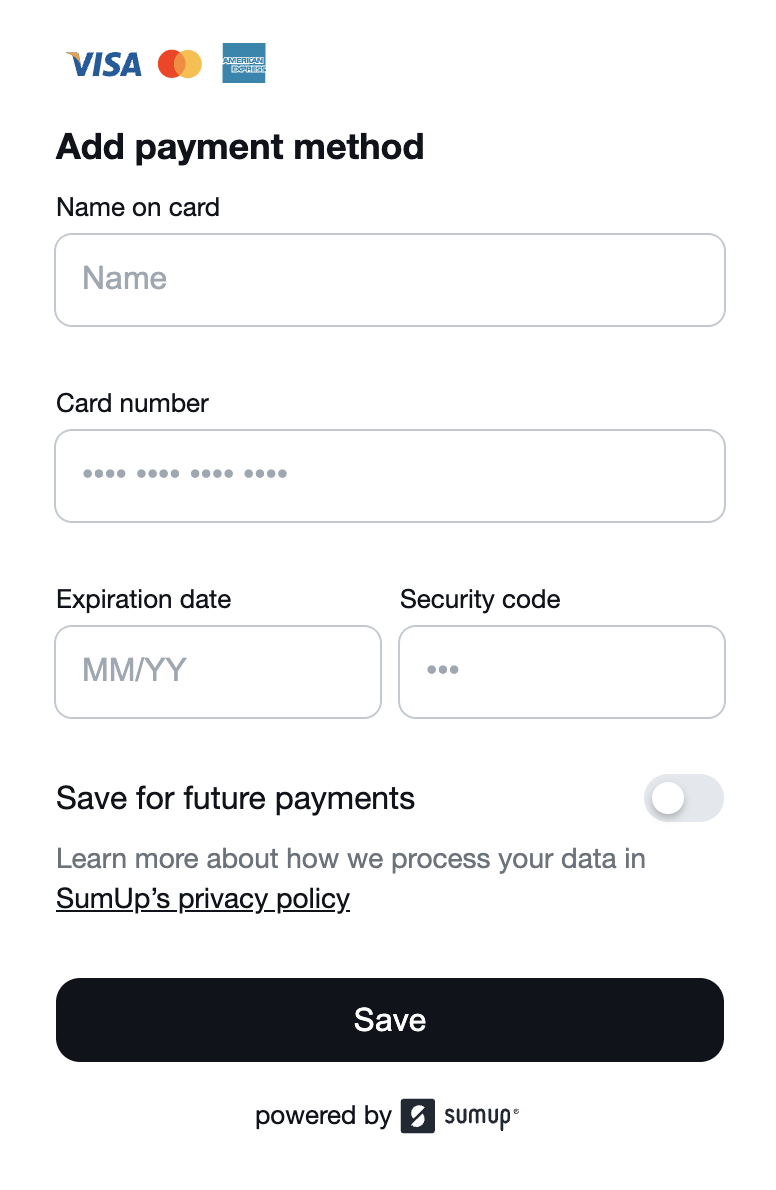
The customer enters their card details, consents to storing them, and completes the checkout in the Payment Widget. The card details are sent directly to SumUp and do not pass through your server.
If the previous operation is successful, and the card is stored with the Save for future payments option, a payment_instrument object containing a token representing the card is created (AKA tokenized card) for this customer.
{
  "payment_instrument": {
    "token": "6878cb7f-6515-47bf-bdd9-1408d270fdce"
  }
}
At any time, you can fetch the list of tokenized cards of a customer by requesting them via the list payment instruments endpoint.
curl -X GET \
  "https://api.sumup.com/v0.1/customers/${CUSTOMER_ID}/payment-instruments" \
  -H "Authorization: Bearer $SUMUP_API_KEY" \
  -H "Content-Type: application/json;charset=UTF-8"
const instruments = await client.customers.listPaymentInstruments("MYCUSTOMERID-123");var instruments = await client.Customers.ListPaymentInstrumentsAsync("MYCUSTOMERID-123");var instruments = client.customers().listPaymentInstruments("MYCUSTOMERID-123");instruments, err := client.Customers.ListPaymentInstruments(ctx, "MYCUSTOMERID-123")instruments = client.customers.list_payment_instruments("MYCUSTOMERID-123")let instruments = client
.customers()
.list_payment_instruments("MYCUSTOMERID-123")
.await?;$instruments = $sumup->customers->listPaymentInstruments('MYCUSTOMERID-123');Retrieving Tokenized Card
Having successfully processed the checkout, a token representing the payment instrument (card) is created. You can now retrieve the checkout to find this token within a payment_instrument object for later recurrent payment.
Relevant fields from the response:
{
  "id": "cd36780e-f43d-4f22-1i9e-e32a1a1bafc8",
  "checkout_reference": "0BYNWLYC7KV",
  "amount": 3.51,
  "currency": "EUR",
  "payment_instrument": {
    "token": "2fa27578-e765-5dbh-aa97-d45d3d6cdfbb"
  }
}
Processing Recurring Payments
Having tokenized the customer’s card, you can now process recurring payments by referencing the saved token and the associated customer. Both token and customer_id fields are required.
- Create a checkout again. This time, it’s for the actual payment. The previous checkout was for tokenizing the card only.
- Process the checkout with the saved token and customer ID. Add
installmentsonly for payments that require it in the Brazilian market:
{
  "payment_type": "card",
  "token": "{{CARD_TOKEN}}",
  "customer_id": "{{CUSTOMER_ID}}"
}
What’s Next?
You may be interested in the following resources related to Online Payments: