Quickstart
Get your first in-person payment running with the right SumUp integration path and the prerequisites for testing.
Get your first in-person payment running quickly.
Prerequisites
Section titled “Prerequisites”- A SumUp merchant account
- A supported reader or Tap to Pay-capable device
- The credentials required for your chosen integration:
- Affiliate Key for Reader SDKs and Payment Switch
- Authorization for Cloud API and Tap to Pay SDK flows
Sandbox Merchant Account
Section titled “Sandbox Merchant Account”To test without real money, create a sandbox merchant account from the SumUp Dashboard.
- Log in to your SumUp account.
- Open the drop-down menu between Support and your user panel.
- Select Sandbox Merchant Account.
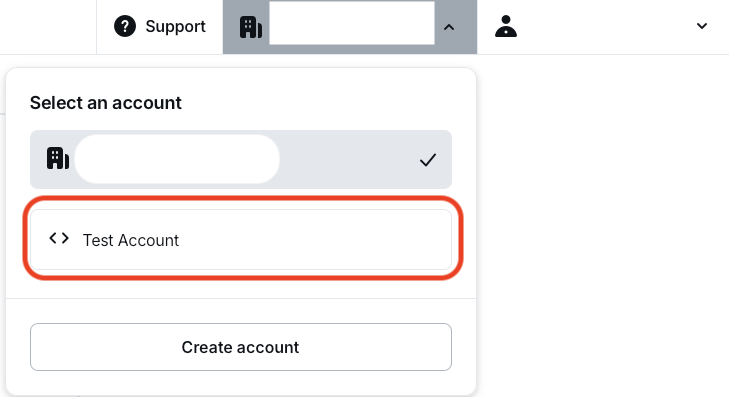
Sandbox accounts do not process real funds. They have a separate merchant ID, show a clear warning in the Dashboard, and requests with a value of 11 always fail by design so you can test failed transaction scenarios.

Choose Your Path
Section titled “Choose Your Path”Reader SDKs
Section titled “Reader SDKs”Best for native Android and iOS apps that want more control over the payment experience.
- Install the SDK for Android SDK, iOS SDK, or Android Tap-to-Pay SDK.
- Authenticate the merchant.
- Pair a reader over Bluetooth, or initialize Tap to Pay on device.
- Start a payment and handle the result in your app.
Cloud API
Section titled “Cloud API”Best for server-driven, web-based, or multi-platform systems using Solo readers.
- Set up authorization for API access.
- Pair or register a Solo reader through the Cloud API.
- Create a checkout for the paired reader.
- Let the reader complete the payment and track the result asynchronously.
Payment Switch
Section titled “Payment Switch”Best for lightweight legacy mobile integrations that hand off checkout to the SumUp app.
- Install the SumUp app on the merchant device.
- Build a Payment Switch request with amount, currency, and a callback URL.
- Open the SumUp app and let it handle the checkout.
- Receive the payment result back in your app.
Next Steps
Section titled “Next Steps”- Need an embedded mobile flow? Continue with Reader SDKs.
- Need remote Solo payments? Continue with Cloud API.
- Need app handoff to SumUp? Continue with Payment Switch.