Online Payments
Get started with accepting online payments. This guide walks you through creating a sandbox merchant account and processing your first transaction in minutes.
Online payments form an integral part of the SumUp product portfolio. SumUp supports online payments through multiple approaches to address every merchant use case. Use one of the out-of-the-box integrations or build a complete custom payments flow with the APIs. Your app communicates with SumUp via HTTP requests defined in the API Reference.
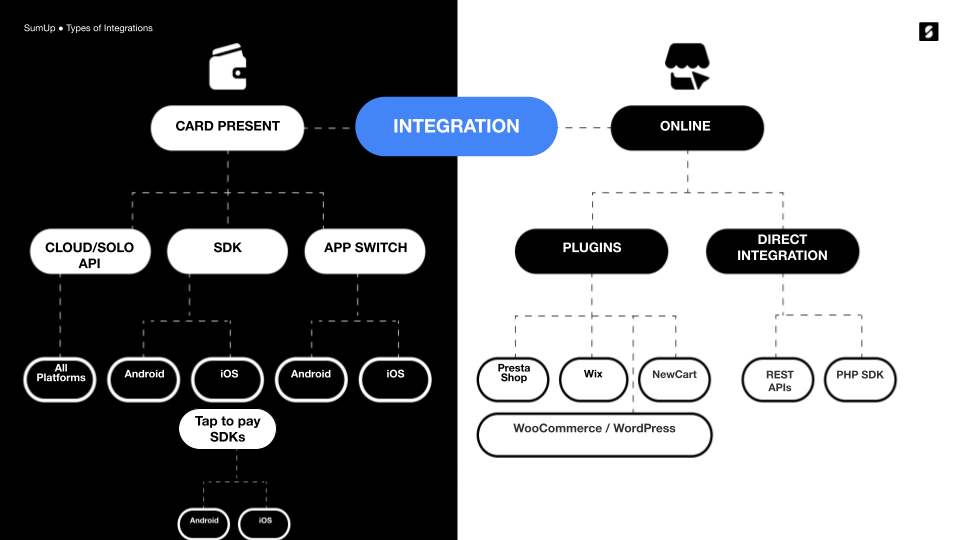
To get started, review the options SumUp offers for managing online payments.
Getting a Sandbox Merchant Account
Section titled “Getting a Sandbox Merchant Account”To test SumUp APIs and tools without involving real money, use a sandbox merchant account. Create one from your Dashboard account as follows.
- Log in to your SumUp account.
- Open Developer Settings(Opens in a new tab).
- In the Sandboxes tab, create a sandbox merchant account if you do not have one yet.
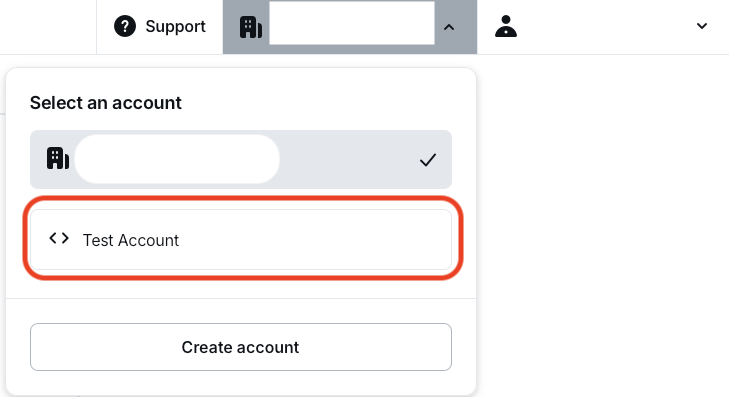
With your sandbox merchant account, begin making API calls with real data. Sandbox merchant accounts do not process transactions with real funds. The sandbox merchant account has a different ID and displays a clear warning. Requests with a value of 11 (in any currency) always fail by design, to test failed transaction scenarios.

When finished experimenting with the sandbox merchant account, switch back to a regular account for business purposes.
Authorization
Section titled “Authorization”All online payment products use SumUp APIs, which require authorization via an API key or access token. See the Authorization Guide for details on available options.
Checkout Products
Section titled “Checkout Products”SumUp provides a range of checkout products for seamless integration with your website.
Hosted Checkout
Section titled “Hosted Checkout”Hosted Checkout is the fastest path to launch. SumUp hosts the payment page, while your integration creates the checkout and redirects the customer to the returned URL.
See the Hosted Checkout documentation for details.
Payment Widget
Section titled “Payment Widget”For an embedded checkout on your own site, use the Payment Widget. It only requires adding a single script to your payment page.
Alternative Payment Methods
Section titled “Alternative Payment Methods”The Payment Widget supports Alternative Payment Methods (APMs) to accept payments beyond traditional card schemes such as Visa and Mastercard. To enable APMs for your Payment Widget integration, use the contact form.
Available APMs include:
- Apple Pay
- Bancontact
- Blik
- Boleto
- EPS
- Google Pay
- iDeal
- PayPal
- PIX
- Przelewy24
Swift Checkout SDK
Section titled “Swift Checkout SDK”The Swift Checkout SDK provides a complete and fast checkout experience to your end users, collecting payment, address, and contact information with a click of a button.
See the Swift Checkout Documentation for details.
Plugins
Section titled “Plugins”For Prestashop, Wix, or WooCommerce, use SumUp plugins for seamless payments. See the Plugins section for details on each.
Custom Integrations
Section titled “Custom Integrations”SumUp APIs
Section titled “SumUp APIs”SumUp provides REST APIs for creating and retrieving checkouts, managing transactions, storing tokenized payment instruments, and issuing refunds. SumUp APIs use API keys or OAuth 2.0(Opens in a new tab) for authentication.
Call authenticated API endpoints from your server. Keep API keys and client secrets out of browsers and mobile apps.
Receiving Payments
Section titled “Receiving Payments”Start by choosing a checkout integration. Your server creates a checkout with the amount, currency, merchant code, and a unique checkout reference. The selected checkout integration then collects the customer’s payment details and completes the payment without sending raw card details through your server.
SumUp supports the following payment paths:
- Hosted Checkout redirects the customer to a SumUp-hosted payment page.
- Payment Widget embeds the SumUp payment form in your website.
- Swift Checkout SDK and the React Native SDK provide checkout experiences for supported mobile use cases.
- Alternative Payment Methods support wallets, bank-based methods, vouchers, and other locally available options.
- Tokenization and recurring payments use a saved payment instrument rather than raw card details.
Do not build a payment form that sends raw card details to the Checkouts API. Use one of the checkout integrations above to collect payment details.