Online Payments
Get started with accepting online payments. This guide walks you through creating a sandbox merchant account and processing your first transaction in minutes.
Online payments form an integral part of the SumUp product portfolio. SumUp supports online payments through multiple approaches to address every merchant use case. Use one of the out-of-the-box integrations or build a complete custom payments flow with the APIs. Your app communicates with SumUp via HTTP requests defined in the API Reference.
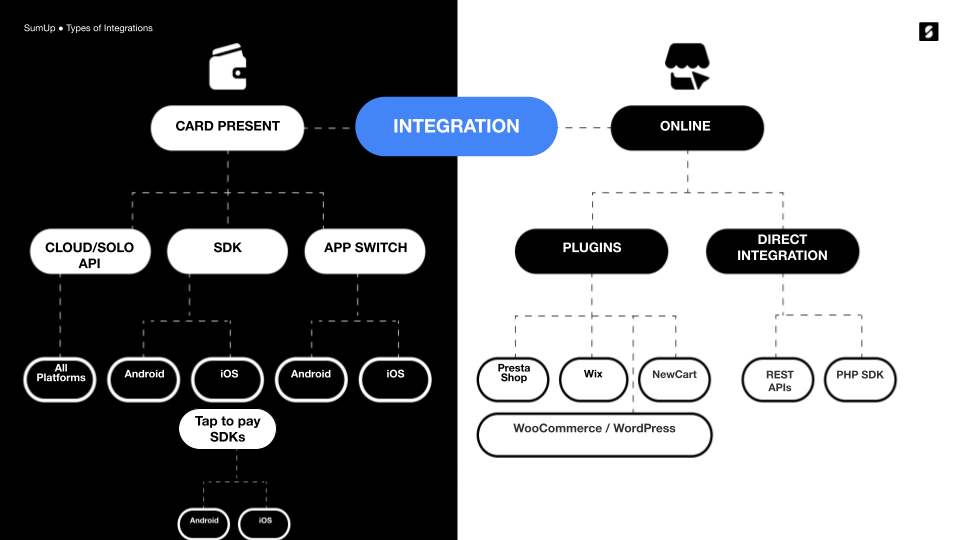
To get started, review the options SumUp offers for managing online payments.
Getting a Sandbox Merchant Account
Section titled “Getting a Sandbox Merchant Account”To test SumUp APIs and tools without involving real money, use a sandbox merchant account. Create one from your Dashboard account as follows.
- Log in to your SumUp account.
- Open Developer Settings(Opens in a new tab).
- In the Sandboxes tab, create a sandbox merchant account if you do not have one yet.
If you don’t have a sandbox account yet, sign up for a developer account(Opens in a new tab). This starts you with a sandbox merchant account.
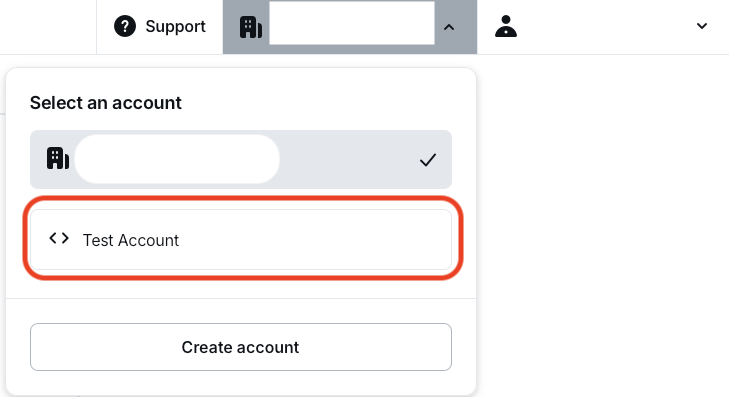
With your sandbox merchant account, begin making API calls with real data. Sandbox merchant accounts do not process transactions with real funds. The sandbox merchant account has a different ID and displays a clear warning. Requests with a value of 11 (in any currency) always fail by design, to test failed transaction scenarios.

When finished experimenting with the sandbox merchant account, switch back to a regular account for business purposes.
Authorization
Section titled “Authorization”All online payment products use SumUp APIs, which require authorization via an API key or access token. See the Authorization Guide for details on available options.
Checkout Products
Section titled “Checkout Products”SumUp provides a range of checkout products for seamless integration with your website.
Hosted Checkout
Section titled “Hosted Checkout”Hosted Checkout is the fastest path to launch. SumUp hosts the payment page, while your integration creates the checkout and redirects the customer to the returned URL.
See the Hosted Checkout documentation for details.
Payment Widget
Section titled “Payment Widget”For an embedded checkout on your own site, use the Payment Widget. It only requires adding a single script to your payment page.
Alternative Payment Methods
Section titled “Alternative Payment Methods”The Card Widget supports Alternative Payment Methods (APMs) to accept payments beyond traditional card schemes (Visa or Mastercard). Access APMs through the SumUp Card Widget by contacting us via the contact form.
Available APMs include:
- Apple Pay
- Bancontact
- Blik
- Boleto
- EPS
- Google Pay
- iDeal
- MyBank
- PIX
- Przelewy24
- Satispay
The APMs you can offer depend on the location your business is registered and operates in.
See the Payment Methods overview for the full list of supported methods grouped by payment method family.
Swift Checkout SDK
Section titled “Swift Checkout SDK”The Swift Checkout SDK provides a complete and fast checkout experience to your end users, collecting payment, address, and contact information with a click of a button.
See the Swift Checkout Documentation for details.
Plugins
Section titled “Plugins”For Prestashop, Wix, or WooCommerce, use SumUp plugins for seamless payments. See the Plugins section for details on each.
Custom Integrations
Section titled “Custom Integrations”SumUp APIs
Section titled “SumUp APIs”SumUp provides REST APIs for services such as creating and executing payments, storing cards, and issuing refunds. SumUp APIs use API keys or OAuth 2.0(Opens in a new tab) for authentication. They also support Cross-Origin Resource Sharing (CORS) for secure browser access from different domains.
The API handles requests and responses primarily in JSON format, except when requests contain form-encoded data. Typically, requests consist of name/value pairs sent to SumUp API URI: api.sumup.com.
Receiving Payments
Section titled “Receiving Payments”To receive payments, create a checkout. Use merchant-direct payments or initiate on a merchant’s behalf based on your authorization type. Checkouts are created via server-to-server communication to keep access tokens and credentials secret and prevent changes to sensitive details like transaction amount or recipient.
Completing checkouts via web browser or mobile app to avoid handling sensitive data like card details on your servers, eliminating PCI DSS compliance needs.
A checkout can be completed in a browser only from a domain that is present as an authorized JavaScript origin when creating your client credentials.
SumUp offers the following checkout completion options:
- You could use Hosted Checkout and redirect the customer to a SumUp-hosted payment page
- You could build a custom card form that you must submit to the SumUp servers for processing
- You could use the Payment Widget
- You could process payments with Alternative Payment Methods, like Boleto, Bancontact & iDeal
- You could process recurring payments
Successful checkout completion processes payment to the merchant’s SumUp account.
Contact SumUp
Section titled “Contact SumUp”Do you have specific questions? Check out our help page for the most frequently asked questions or contact us here.