WooCommerce
Accept SumUp payments with the WooCommerce plugin.
The SumUp Payment Gateway for WooCommerce(Opens in a new tab) enables payments on WordPress sites without coding, enabling your customizations and providing your customers the convenience of securely buying products from your website without being redirected to other pages. The plugin supports major cards (Visa, Mastercard, Amex, Diners, Discover, JCB) via embedded forms. Transactions are processed through the SumUp payment platform with transaction history provided in the SumUp Dashboard(Opens in a new tab).
Go to plugin page
Prerequisites
Section titled “Prerequisites”-
Active SumUp account(Opens in a new tab). If you don’t have one yet, sign up on our website(Opens in a new tab). As an authorized Payment Institution by the Central Bank of Ireland, SumUp must verify your identity and business ownership.
-
Review allowed businesses(Opens in a new tab) before signing up(Opens in a new tab).
Installing the Plugin
Section titled “Installing the Plugin”Automatic Installation
Section titled “Automatic Installation”The automatic installation is the easiest option, as WordPress handles the file transfer and you don’t need to leave your web browser.
- Install the plugin via the Plugins section in the WordPress Dashboard.
- Click on Add new and search for SumUp Payment Gateway for WooCommerce.
- Click on the Install Now button.
- Click Activate to active the plugin.
Manual Installation
Section titled “Manual Installation”-
Upload it to your web server using FTP. See WordPress codex(Opens in a new tab) for details on how to do this.
Before setting up the plugin, create your client credentials.
Integration Options
Section titled “Integration Options”For plugin versions 2.5 or later, both a simple and advanced integration flows are available. If you are using a plugin version below 2.5, follow the steps in our advanced integration guide.
Simple Integration
Section titled “Simple Integration”Available for plugin versions above 2.5.
-
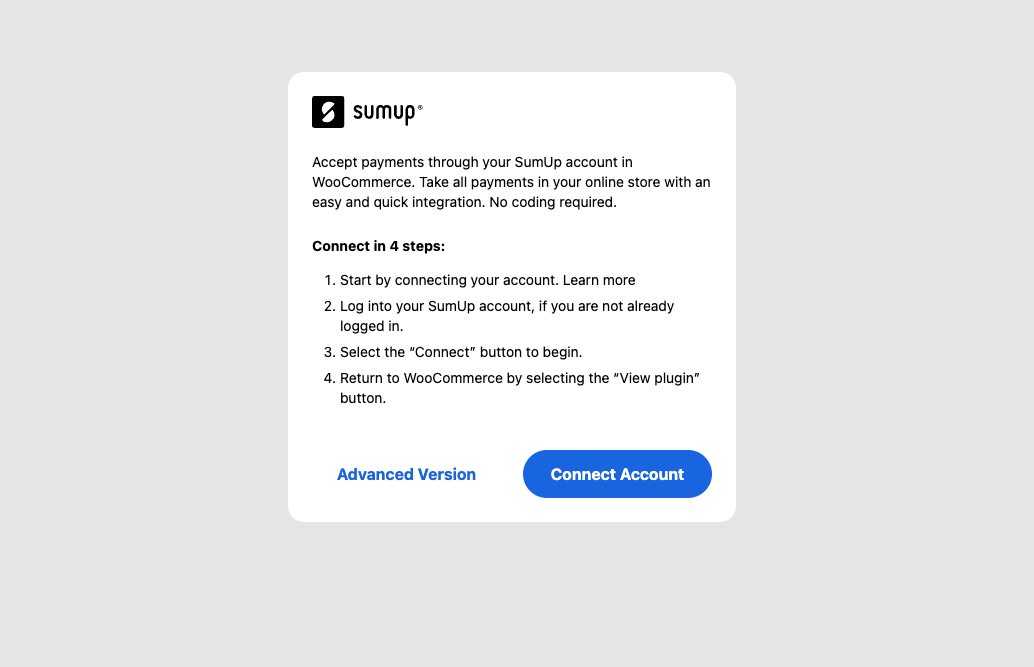
Click Connect account to initiate the lightweight integration flow (redirects to SumUp Dashboard).
-
In your SumUp Dashboard, click on Start setup to generate your production API keys.
Once the flow is initiated, we will take care of generating live API keys for your SumUp account. When the flow completes successfully, they will become available to your WordPress shop.
At this point, you can start accepting payments through SumUp on your WordPress shop.
Advanced Integration
Section titled “Advanced Integration”- Once the plugin is activated, click Advanced version.
- Create your API Key.
- Enter SumUp credentials (API Key, email, and merchant code) and settings.
Additional Configuration
Section titled “Additional Configuration”- Enable the SumUp Payment Gateway
- Set customer-facing title/description
- Apply an optional payment method description, visible by your customers
- Match shop currency to SumUp account
- Require ZIP code from your customers. Mandatory for US merchants
- We recommend enabling the logging option for better troubleshooting should any issues occur (logs can be found in WooCommerce > Status > Logs)
- Choose between popup or embedded payment form with the Open Payment in modal? option
Update Your Website
Section titled “Update Your Website”Before accepting payments through SumUp, your website should display the following information:
- Business & product information
- Delivery, cancellation & return/refund policy
- Payment & billing process
- All prices must have the respective currency prefix
- Privacy policy
- Security policy
Configuration for Legacy Plugin (Version Older than 2.5)
Section titled “Configuration for Legacy Plugin (Version Older than 2.5)”Create Your Client Credentials
Section titled “Create Your Client Credentials”To create client credentials you must have an active SumUp account(Opens in a new tab) with completed account details(Opens in a new tab). Your account has successfully completed the onboarding process, and you have received the payments scope activation. If you don’t have the payments scope activated yet, contact us for assistance.
Once you ensure you’ve met the above requirements, you can proceed with our Register application guide to set up your client credentials.
Plugin Configuration
Section titled “Plugin Configuration”Now that you have created your client credentials and installed the plugin, you can proceed with configuration.
In WordPress Dashboard, go to Plugins `. Settings under the SumUp WooCommerce plugin. You will find the following customization options:
- Enable the SumUp Payment Gateway
- Apply custom title of the payment method, visible by your customers
- Apply an optional payment method description, visible by your customers
- Apply your shop currency corresponding to the one set in your SumUp account
- Client ID and Client Secret of your application. Both are located in the JSON file you created in the Create your client credentials step, in the following key-value pair:
{ "id": "CCCFAXYD", "name": "My Online Store Name", "client_id": "fOcmczrYtYMJ7Li5GjMLLcUeC9dN", "client_secret": "717bd571b54297494cd7a79b491e8f2c1da6189c4cc2d3481380e8366eef539c", "application_type": "web", "redirect_uris": ["https://mywebsite.com/callback"]}- The email address of your SumUp merchant account
- The merchant code associated with your SumUp account
- Require ZIP code from your customers. Mandatory for US merchants
- We recommend enabling logs for better troubleshooting, should any issues occur (Logs can be accessed in WooCommerce > Status > Logs)